


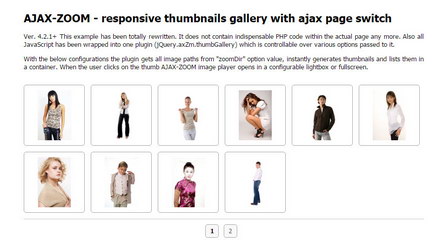
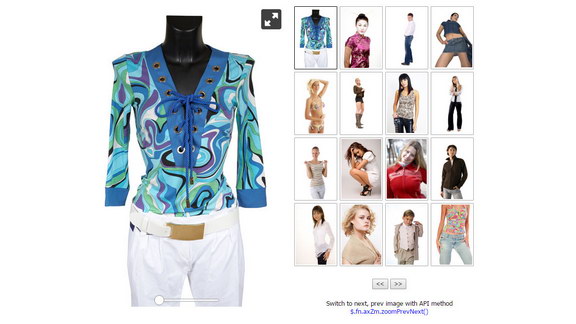
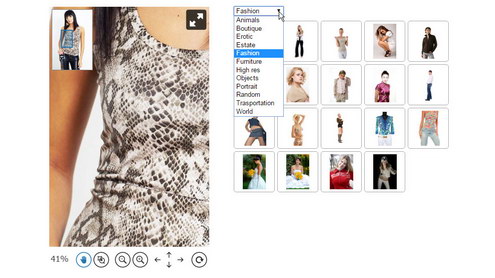
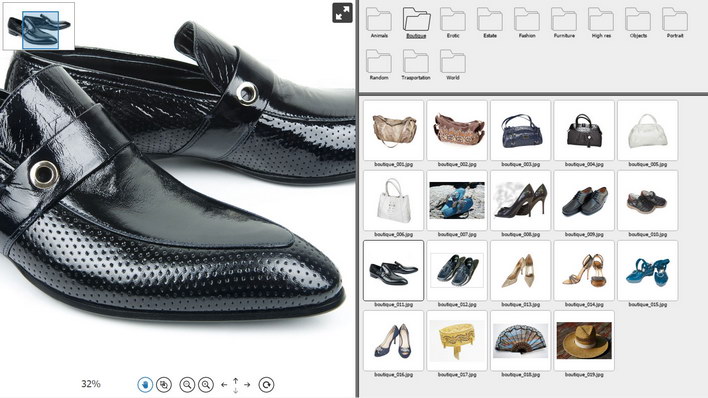
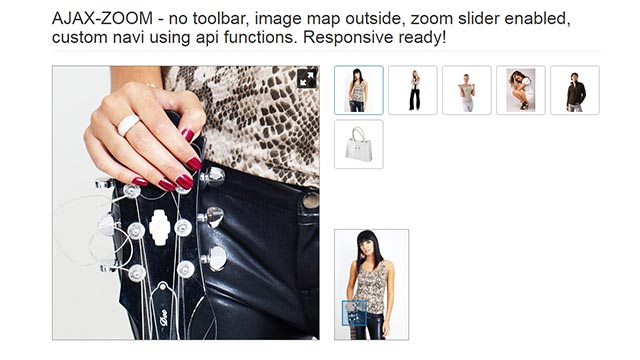
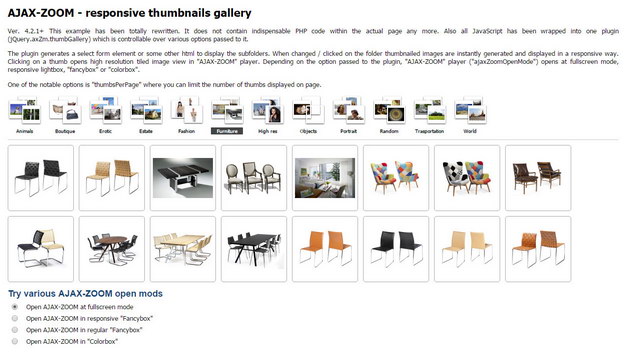
In this example, thumbnails of large images from different folders load into responsive grid outside of the zoom viewer.
The AJAX-ZOOM viewer displays to the side of the thumbnails in a different container.
Thumbnails in gallery respond to clicks and loads high-resolution image into the zoom viewer.
All code is wrapped into a single $.azThumbGallery jQuery plugin, which is one of AJAX-ZOOM extensions.
All you need is to pass image paths via zoomData option of the extension and define the containers where you want the gallery and the viewer to appear.
The extension has several other options to fine tune the appearance of the entire composition.
This example also contains external controls to show basic usage of AJAX-ZOOM API.
With the controls you can switch to next or previous image using $.fn.axZm.zoomPrevNext method.
$.fn.axZm.zoomPrevNext.
You can define type of transition by the parameter of this method or globally.
To achieve a similar result as with the $.axZm.thumbGallery extension,
you could also use the native AJAX-ZOOM $.fn.axZm.zoomSwitch API method.
However, the $.axZm.thumbGallery extension has many comments and you could extend it to suit your needs.
This extension is used in several other examples.
You might want to look at1 them before declaring it as not suitable.
<!-- jQuery core, needed if not already present! -->
<script type="text/javascript" src="../axZm/plugins/jquery-2.2.4.min.js"></script>

<!-- AJAX-ZOOM core, needed! -->
<link rel="stylesheet" href="../axZm/axZm.css" type="text/css">
<script type="text/javascript" src="../axZm/jquery.axZm.js"></script>

<!-- AJAX-ZOOM thumbGallery extension, needed! -->
<link rel="stylesheet" href="../axZm/extensions/jquery.axZm.azGrid.css" type="text/css">
<link rel="stylesheet" href="../axZm/extensions/jquery.axZm.thumbGallery.css" type="text/css">
<script type="text/javascript" src="../axZm/extensions/jquery.axZm.thumbGallery.js"></script>
Both containers can be responsive! If the container where AJAX-ZOOM will be loaded into is responsive, then set "embedResponsive" option below to true.
<div class="col-md-6">
	<!-- Container where AJAX-ZOOM will be loaded into -->
	<div id="zoomInlineContent" style="height: 600px; position: relative; max-height: calc(100vh - 50px)"></div>
</div>
<div class="col-md-6">
	<!-- Container where thumbs will be loaded into -->
	<div id="thumbsParentContainer"></div>
</div>
| Option | Default | Description | |||||||||||||||||||||||||||
|---|---|---|---|---|---|---|---|---|---|---|---|---|---|---|---|---|---|---|---|---|---|---|---|---|---|---|---|---|---|
| axZmPath | 'auto' | The path to the "/axZm" folder, e.g. /test/axZm/ | |||||||||||||||||||||||||||
| folderSelect | 'select' | The look of navigation for subfolders. Only useable if "zoomDir" is defined (not with "zoomData"). Possible values: "select", "folders", "imgFolders" or false | |||||||||||||||||||||||||||
| zoomDir | null | A path to subfolders with images; If "folderSelect" is set to false, then you can define the path directly to some folder with images. | |||||||||||||||||||||||||||
| firstFolder | null | After page loads, select from which "zoomDir" subfolder the thumbnails should load first. As an integer (index of subfolder) or string (name of the subfolder). If nothing is defined and there is no hash value (see "setHash" option below), the first subfolder loads first. | |||||||||||||||||||||||||||
| zoomData | null | As an alternative to the "zoomDir" option, where all images from a folder or subfolders are loading, you can define several images from different folders. The value of the "zoomData" option can be CSV string separated with "|". | |||||||||||||||||||||||||||
| folderIconPrefix | 'folder_icon_' | This option applies if the value of the "folderSelect" option is "folders". The value of this option is the prefix of an icon image located in "/axZm/icons" directory. On default, the three icons are: folder_icon_close.png, folder_icon_close_over.png, folder_icon_open.png | |||||||||||||||||||||||||||
| imgFoldersSettings | {} |
This option applies only if the value of the "folderSelect" option is "imgFolders".
| |||||||||||||||||||||||||||
| folderNameFunc | function |
This is a "filter" function for the titles of the subfolders.
The first argument passed to the function is the name of the subfolder from the file system.
This input string can be changed and returned in a different way.
On default, this function makes first letter uppercase, replaces _ (underscore) to empty space and truncates the resulting string to max. 15 characters.
If you do not want to have any changes, simply set folderNameFunc to function(input){return input;}
| |||||||||||||||||||||||||||
| axZmCallBacks | {} | AJAX-ZOOM has several callbacks, https://www.ajax-zoom.com/index.php?cid=docs#onBeforeStart. If you want to extend the functionality of the AJAX-ZOOM viewer by using those callbacks, you can define them in this object. | |||||||||||||||||||||||||||
| fullScreenApi | false | Try to open AJAX-ZOOM at browsers fullscreen mode, possible on modern browsers except for IE < 10 and mobile | |||||||||||||||||||||||||||
| setHash | false | Set location hash when users navigate between the folders. Setting the location hash results in switching between folders when the user hits the back browser button. Also if the location address is copied with the hash, the folder in the hash opens as first. | |||||||||||||||||||||||||||
| thumbModel | 'grid' |
Type of thumbnails layout.
Possible values are 'grid' and 'fixed'.
When "fixed", the "thumbWidth" and "thumbHeight" options determine a fixed size of the thumbnails. When "grid", the size is determined depending on the resolution, width of the parent container and the number of thumbnails, which should display in one row. You can define the numbers in the "thumbUlClassGrid" option. | |||||||||||||||||||||||||||
| thumbGridAspectRatio | 1.0 | Aspect ratio of the thumbnails if "thumbModel" is "grid". "thumbUlClassGrid" must contain azGridThumb class. For e.g. 16:9 format set 1.7777777777, for 2:1 -> 2.0 | |||||||||||||||||||||||||||
| thumbGridTop | false | Align image at the top position within the thumbnails container. This option might be useful if you define the descriptions for the thumbnails. | |||||||||||||||||||||||||||
| thumbUlClassGrid | 'azGridThumb azGrid-10-xxl azGrid-8-xl azGrid-6-lg azGrid-6-md azGrid-4-sm azGrid-2-xs' |
Class for the UL element, when "thumbModel" option value is "grid".
On default, you can choose from predefined azGrid-[1-16]-[xs, sm, md, lg, xl, xxl].
It has not much to do with bootstrap.
However, the breakpoints are set the same as they are in Bootstrap 3, 4.
The number after azGrid- determines how many thumbnails you would like to see in one row
and the xs, sm, md, lg or xl letters determine the interval of screen resolutions.
The default screen width breakpoints are:
azGrid-8-xl means 8 thumbnails in one row at a screen width of more than 1200 pixels.
azGrid-6-lg menas 6 thumbnails in one row at screen width between 992 to 1200 pixels etc.
The CSS can be changed and extended.
When defining the "thumbUlClassGrid" option values using azGrid-x-y CSS classes,
please cover all possible intervals (xs, sm, md, lg, xl) like it is set on default, whereby xxl is not required.
| |||||||||||||||||||||||||||
| thumbUlClassFixed | 'azFixedThumb' | CSS class for the UL element, when "thumbModel" option value is "fixed". | |||||||||||||||||||||||||||
| thumbGridSizes | [...] |
Possible physical sizes of the thumbnail images, when the "thumbModel" option value is "grid".
The script instantly chooses the right size depending on pixel density and thumbnails size.
The array contains objects with "w", "h" and "q" properties.
| |||||||||||||||||||||||||||
| thumbWidth | 120 | The width of the thumbnail image, when the value of "thumbModel" option is "fixed". | |||||||||||||||||||||||||||
| thumbHeight | 120 | The height of the thumbnail image, when the value of "thumbModel" option is "fixed". | |||||||||||||||||||||||||||
| thumbRetina | true | Doubles the resolution of the thumbnails images for high DPI screens, when the value of "thumbModel" option is "fixed". | |||||||||||||||||||||||||||
| thumbsCache | true | Cache thumbnails. | |||||||||||||||||||||||||||
| thumbQual | 90 | The jpg quality of the thumbnail images. | |||||||||||||||||||||||||||
| thumbMode | false | Geometry of the thumbnails. Possible values are: "contain", "cover" or false | |||||||||||||||||||||||||||
| thumbBackColor | '#FFFFFF' | Background color of the thumbnails if "thumbMode" is set to "contain". | |||||||||||||||||||||||||||
| thumbPadding | null | Quickly overwrite the CSS padding of the thumbnails, when the value of "thumbModel" option is "fixed". | |||||||||||||||||||||||||||
| thumbMarginRight | null | Integer or null. Quickly overwrite the CSS margin to the right of the thumbs, when the value of "thumbModel" option is "fixed". | |||||||||||||||||||||||||||
| thumbMarginBottom | null | The value can be an integer or null. Quickly overwrite the CSS margin to the bottom of the thumbs, when the value of "thumbModel" option is "fixed". | |||||||||||||||||||||||||||
| thumbCss | {} | Quickly add any CSS by extending the style attribute (inline CSS) for the thumbnails. | |||||||||||||||||||||||||||
| thumbPreloadingImg | 'ajax-loader-map-white.gif' | Image located in /axZm/icons directory, which will appear before the thumbs are loaded, when the value of "thumbModel" option is "fixed". This is a legacy option. | |||||||||||||||||||||||||||
| thumbPreloadingClass | 'azThumbPreLoader' | Layer with CSS class, which will appear before the thumbs are loaded, when the value of "thumbModel" option is "grid". | |||||||||||||||||||||||||||
| thumbDescrObj | {} |
An object that contains thumbnail descriptions, e.g.:
| |||||||||||||||||||||||||||
| thumbDescr | [] |
This option is an alternative or amendment to the "thumbDescrObj" option.
The option is an array, and it may contain these elements: "fileName", "thumbDescr", "fullDescr".
The values for "thumbDescr" and "fullDescr" are returned from request to AJAX-ZOOM.
On default, "thumbDescr" returns resolution of the original image.
It is adjustable in /axZm/zoomConfig.inc.php or a
different configuration file
by setting the $zoom['config']['galleryThumbDesc'] and $zoom['config']['galleryThumbFullDesc'] AJAX-ZOOM core configuration options.
You can see the usage of this option in example11.
| |||||||||||||||||||||||||||
| thumbDescrJoin | '<br>' | If the return from "thumbDescrObj" and "thumbDescr" has more than one element, they are split by this string. | |||||||||||||||||||||||||||
| thumbDescrTruncate | false | Truncate the resulting description by the number of chars that you define in this option and add [...] at the end. Set to false to disable truncating. | |||||||||||||||||||||||||||
| thumbsPerPage | null | In case the number of thumbnails exceeds the "thumbsPerPage" value, the extension appends "page numbers" (pagination) under the container with the thumbnails. Set to null to disable pagination. | |||||||||||||||||||||||||||
| thumbsPerPageResponsive | null | If this option is activated, the number of thumbnails per page depends on screen size. The exact values are defined in the "thumbsPerPageNumber" option. If enabled, the "thumbsPerPage" option overrides the "thumbsPerPageResponsive" option and makes the amount of the thumbnails in a row not responsive. | |||||||||||||||||||||||||||
| thumbsPerPageRows | 1 | The number of rows if "thumbsPerPageResponsive" option is active. Depending on the resolution, the number of thumbnails in each row is defined by the "thumbsPerPageNumber" option. | |||||||||||||||||||||||||||
| thumbsPerPageNumber | {...} |
An object that contains pairs of keys and values representing the screen resolution breakpoints and number of thumbnails when "thumbsPerPageResponsive" option is enabled.
Default value:
| |||||||||||||||||||||||||||
| thumbsPerPageBreakPoints | [...] |
Array, containing arrays with breakpoint and javascript function, defining the range of screen resolution.
The "w" and "h" arguments are passed to the functions, which represent the width and height of the current browser's window size.
The default values match the predefined CSS grid, see "thumbUlClassGrid" option:
| |||||||||||||||||||||||||||
| pageNavPosition | 'bottom' | Position of the pagination container. Possible values are: "bottom" ot "top". | |||||||||||||||||||||||||||
| thumbsContainer | 'thumbsParentContainer' | The ID of the container where into thumbnails should be inserted. The container can be responsive or adaptive. | |||||||||||||||||||||||||||
| selectContainer | 'selectParentContainer' | The ID of the container where into the folders navigation (see "folderSelect" option) should be inserted. The container can be responsive or adaptive. | |||||||||||||||||||||||||||
| ajaxZoomOpenMode | 'fullscreen' |
This option determines how AJAX-ZOOM should open when the user clicks on an image thumbnail.
Possible values:
| |||||||||||||||||||||||||||
| openModeEnforceFullscreen | 1024 | Instantly set "ajaxZoomOpenMode" to fullscreen if the width of the device is below or equal to this value. Does not apply / have no effect, if "embedMode" is enabled. | |||||||||||||||||||||||||||
| exampleFullscreen | 'mouseOverExtension' | Configuration set 2, which is passed to AJAX-ZOOM when "ajaxZoomOpenMode" is 'fullscreen' | |||||||||||||||||||||||||||
| exampleFancyboxFullscreen | 'mouseOverExtension' | Configuration set 2, which is passed to AJAX-ZOOM when "ajaxZoomOpenMode" is 'fancyboxFullscreen' | |||||||||||||||||||||||||||
| exampleFancybox | 'modal' | Configuration set 2, which is passed to AJAX-ZOOM when "ajaxZoomOpenMode" is 'fancybox' | |||||||||||||||||||||||||||
| exampleColorbox | 'modal' | Configuration set 2, which is passed to AJAX-ZOOM when "ajaxZoomOpenMode" is 'colorbox' | |||||||||||||||||||||||||||
| fancyBoxParam | {} | If Fancybox is used in "ajaxZoomOpenMode" option, this object represents the Fancybox options . | |||||||||||||||||||||||||||
| colorBoxParam | {} | If colorbox is used in "ajaxZoomOpenMode" option, this object represents the Colorbox options . | |||||||||||||||||||||||||||
| embedMode | false | Display AJAX-ZOOM next to the thumbs. Please see below this list to find out in which examples this option applies. | |||||||||||||||||||||||||||
| embedDivID | '' | This option applies when "embedMode" is enabled. The value is the ID of a container where the script should append the AJAX-ZOOM viewer. In case the "embedDivID" is a responsive container, please set "embedResponsive" to true! | |||||||||||||||||||||||||||
| embedResponsive | true | If "embedDivID" is responsive, you should enable this option. | |||||||||||||||||||||||||||
| embedMapInThumb | true | Show AJAX-ZOOM "image map" in place of selected thumbnail. Needs $.axZm.embedMapParent set via JS or $zoom['config']['embedMapParent'] in PHP file. See example16 to view the effect. | |||||||||||||||||||||||||||
| embedExample | 9 | Configuration set 1 which is passed to AJAX-ZOOM when "embedMode" is enabled | |||||||||||||||||||||||||||
| embedZoomSwitchAnm | 'SwipeHorz' | When the user clicks on a thumbnail, the image inside AJAX-ZOOM switches with one of the following effects: "Center", "Top", "Right", "Bottom", "Left", "StretchVert", "StretchHorz", "SwipeHorz", "SwipeVert", "Vert", "Horz"; | |||||||||||||||||||||||||||
| embedZoomSwitchSpeed | 300 | Set speed (duration) of switching. This option overrides the following AJAX-ZOOM internal options: galleryFadeInSpeed, galleryInnerFade, gallerySlideSwipeSpeed. Set the value to "embedZoomSwitchSpeed" to diable this overriding. | |||||||||||||||||||||||||||
| embedSwitchWithPage | true | If "thumbsPerPage" is activated and page numbers are present, then clicking on the page number switches to the first image shown on that page. | |||||||||||||||||||||||||||
| embedFirstImage | 1 | When gallery loads first, the index (number) or a file name which should load first. See also the "firstFolder" option. | |||||||||||||||||||||||||||
| Last updated: 2019-02-08 | |||||||||||||||||||||||||||||
elseif ($_GET['example'] == [someValue])