Responsive 360° product viewer / standalone 360° player with deep zoom
One of the outstanding features of the AJAX-ZOOM media viewer is the 360° rotary view of the products/objects.
Each control element (there are plenty of them) can be switched off, expanded, and adapted.
In addition, the behavior and feel of the player are adjustable to the most refined detail.
Above is an example of the standalone 360° product viewer with 36 images.
The native resolution of each image is 7216 x 5412px. These are about 39 Megapixels!
The images of the bike were shot with a "Hasselblad" camera, but nowadays, there are several affordable
DSLRs from "Canon" or "Nikon", which can achieve the same resolution range.
Despite the high resolution, the 360° product view is loaded very quickly.
That is due to the multiscale resolution technology where only parts of the image are loaded,
which are needed for the zoom level and viewport.
However, you do not necessarily need to use the ultra-high resolution to take advantage of multi-resolution technology in general.
Even with 8, 10, or 20-megapixel images, the difference quickly becomes apparent.
If you do not want to use the multi-resolution technology, you can disable it
by enabling the AJAX-ZOOM "simple mode" option. Please find more reading and visual testing on the "simpleMode" option
here.
Please note that the overloaded example above should only show the range of possibilities, which nevertheless are not shown in full here.
AJAX-ZOOM supports hotspots (interactive markings on the image) not only on 360° degree product views,
as presenting above, but also on 3D product views and plain images, including image galleries.
Hotspots are also compatible and combinable with
"interactive product tours", as shown in the next tab above.
You can choose to create hotspots with the hotspot editor contained in the download package,
or you can dynamically create them via AJAX-ZOOM API, e.g., from data retrieved from a database.
Therefore, you do not have to rely solely on the hotspot editor and could generate any number of hotspots via JavaScript dynamically.
If you are using one of our shopping cart modules,
you will find the hotspot editor in the administrator area of your CMS already integrated and ready to use without additional programming.
But, it is also easily possible to integrate the hotspot editor into existing applications without using AJAX-ZOOM modules!
By default setting the JSON-like code generated in this hotspot editor is stored in a file.
However, you can also store this data into a database table or wherever else.
Within the code of the hotspot editor, there is a possibility to change the storage method and location over a code switch.
When you do so, the get and put actions redirect to an AJAX controller path of your choice.
Within the controller, you decide what happens with the data or where it comes from.
With this image viewer, you can display high-resolution, ultra-high-resolution, and less-resolving images responsively. You have the choice to enable or disable any control element or place it differently.
Swiping between high-resolution images has never been easier and faster before.
In addition, you could add the so-called hotspots (interactive in-the-image markers), control the player externally via API, and expand the functionality as desired.
In the download package, you will also find various examples where you can combine this plain image viewer with our 360° degrees or 3D product viewer and add various video players.
The slider works well on mobile devices and obeys intuitive gestures such as multi-touch pinch zoom or swipe.
Considering that this is a multiscale resolution image viewer, there is not too much more one can expect from it to make it better.
However, we are constantly looking to improve the performance and functionality.
Responsive multimedia swipe gallery with 360° product spins, images with progressive zoom feature and videos, AJAX and IFRAME content
For a 360 or 3D web-view, the settings in this example are set the way that the user has only the possibility to spin at none zoomed state.
Upon a click, the image or 360 will zoom to its original size.
Another click at zoomed state causes the image to full zoom out again.
Additionally, a zoom-out button appears when zoom on the image is applied.
The above-described behavior is actually typical for many none multi-resolution players, where the original heavy image is entirely loaded at 100% zoom.
With AJAX-ZOOM viewer, however, the user does not have to wait until this large image is fully loaded.
AJAX-ZOOM loads only that part of the zoomed image, which is visible on zoom, and the view gets sharp immediately without the user need to download several megabytes of unrequested data volume.
On fast connections, the user will not even notice that this part of the image is downloading because the corresponding "image tiles" are loaded while zooming transition runs, and the tiles are faded in straightly after the zoom animation ends or even earlier while the animation runs.
This reasonably simple concept is mainly used for showing detailed maps online.
Google maps use this, and actually, any maps service uses this, as it would be strange if you needed to download the entire world map to view your neighborhood, right?
With AJAX-ZOOM, you can take advantage of this technology without really understanding it.
Simply use this zoom magic in your online store or product's website and profit from this deep zoom enlargement without worrying about image sizes being too large for a web view.
The same is true for mobile users; it simply makes no difference.
It might be worth mentioning at this place that AJAX-ZOOM can also load original images instead of image tiles on zoom.
For this, you just need to activate the AJAX-ZOOM's simpleMode option.
Moreover, you can set it the way that for low-resolution images, the original image loads on zoom, while for higher resolution images, the multi-scale tiles technology is applied.
The resolution threshold is adjustable over the same simpleMode option.
Alternatives
Similar functionality with mixed content in one viewer (360/3D, video, and regular images) can also be achieved with this extension/example,
where depending on the settings, you can enable mouseover zoom or swipe slider as a preview for your high-resolution images.
3D photography views are multiline or multi-row 360 images.
Photos of an object are taken not only from each angle horizontally but also from the same angles when the camera is shifted vertically following the spherical path.
We call it a row or line.
So talking about 3D in the AJAX-ZOOM viewer's software context implies that there are at least two 360 round views of the same product that have an equal amount of images in each of the round views.
AJAX-ZOOM supports the multi-row 360 images too.
You can find an isolated example of a 3D product view in this example.
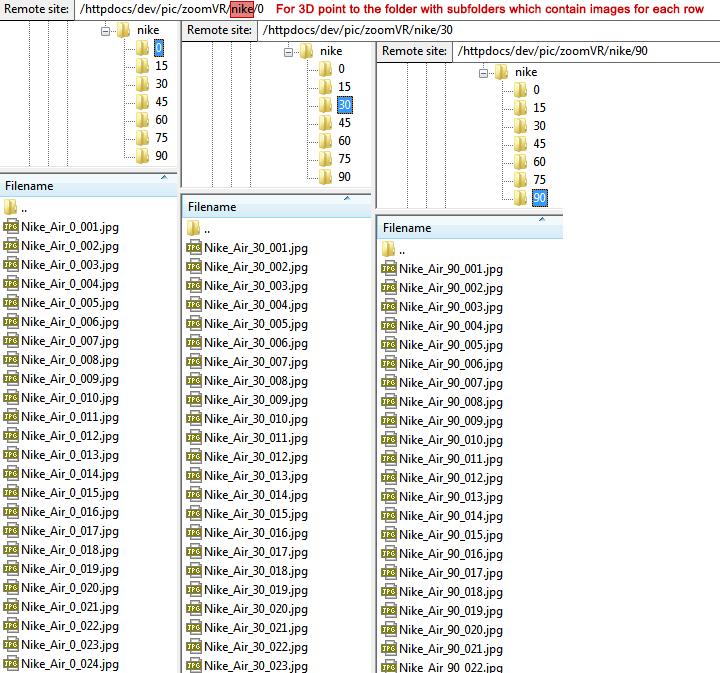
As of AJAX-ZOOM-related integration and file structure, the basic difference between 360° and 3D is that for 360°, you need to provide the path to a folder, where 360-degree image frames are located directly in this folder.
Whereas for 3D, you need to provide the path to a folder, which contains further subfolders with images of each 360 round view in each subfolder.
Once again, the number of image files in each subfolder must be equal.
Also, all images must have the same dimensions - width x height.
Otherwise, AJAX-ZOOM throws an error.
The naming of the files does not have to follow a specific scheme.
You just need to name them the way that a machine can sort the image files using a regular sorting algorithm.
However, you must name files in each folder differently.
This rule applies to rows of a 3D view as well as different 360-degree views in general.
The reason is the AJAX-ZOOM's caching caching mechanism that relies on this rule.
Responsive photo swipe gallery with thumbnails slider
AJAX-ZOOM has many possibilities to create pure picture galleries.
Above, you can see a gallery with an "internal" thumbnail slider.
By options' values, you can arrange the slider's position to be vertically (left/right) or horizontally (bottom/top).
Those internal galleries display within the viewer's box, and all the internal calculations aim to preserve the exact fitting of the entire viewer inside its parent container.
Therefore, if the parent container has determined proportions defined by your CSS, the viewer will exactly fit into this HTML element and resize itself if that responsive parent container changes its size.
AJAX-ZOOM generates all resized representations of the larger source image automatically and caches them in a specified directory.
There are several predefined methods to determine the array of images to load into the gallery.
You can provide a list of individual image paths, or you can specify a local path to a folder from which AJAX-ZOOM will automatically read all supported image types and add them to the gallery.
With the help of AJAX-ZOOM API methods,
you can replace the entire set of images loaded into the gallery dynamically, e.g., by calling these methods from an external JavaScript or simply binding to the onclick event of a button inline.
In this simple example,
you can examine the code responsible for switching the content of the gallery by pressing on the buttons below the AJAX-ZOOM image gallery.
If you find this type of presenting photos useful for your project but would like to add 360-degree views or videos to the same container,
please view example29_responsive_easy
or example32_axZmMode.
About the AJAX-ZOOM's image zoom on hover extension in short
The extension automatically creates a media gallery from data, which is provided in the JavaScript configuration object.
Usually, the minimal required data consists of paths to the original images or paths to folders that contain photos making up a 360 or 3D view.
You can provide this data manually while testing or when you have only a few pages with a hand-written input.
When integrating it into a database-driven and structured system, you can extract the required data, e.g., image paths from template variables or request directly from the database.
Within the mouseover extension, you can set the gallery's position relative to the viewer statically (right, left, top, and bottom).
Or, you can define several "breakpoints" and other parameters to position the gallery dynamically from a set of gravity directions.
In the above configuration, the position is either left or bottom.
When the width of the stage is less than 400px, which is an adjustable option, the bullet type of navigation replaces the gallery.
The thumbnail gallery,
which is a separate and independent component of the mouseover extension, has many additionall configuration parameters.
You could also entirely disable the thumbnail gallery and let the users switch between the items by swiping or pressing on the arrows or bullet navigation.
The proportions of the viewer can be "fixed", for example, by 1 or 1 by 1.5,
the can correspond to the proporions of an image, or you can define to automatically determin the proportions via breakpoints.
Regardless of the order within the media gallery, any media element - a picture, a 360° product view, or a video can load first!
That is especially important if you would like to open this mouseover extension in a modal window upon a click on your already existing gallery.
Not that you necessarily would need a mouseover extension in a modal box, but that makes a lot of sense having specific options enabled or disabled; have a look at it!
For displaying an image, the extension only requires a path to the high-resolution "master" image.
The image resizing takes place automatically.
You can define the sizes of the thumbnails and the mouseover preview images separately.
It is essential to point out that the mouseover zoom or slider does not load the high-resolution "master" image but a resized smaller version of it.
By default AJAX-ZOOM's core settings,
the size of the flyout image (the image that shows in a flyout window when hovering the slider with the mouse) is limited to 1200x1200px.
That is usually sufficient for a preview.
When the user clicks on the lense, the high-resolution image opens in the AJAX-ZOOM viewer - either in a responsive modal box or immediately at fullscreen.
The details of an image displayed in the AJAX-ZOOM viewer, including pictures of a 360-view, progressively load as the user zooms into it.
Within the AJAX-ZOOM media player, only parts of the large image required by dimensions and viewport are loaded so that, for example, a 50-megapixel image is visible immediately.
You can even protect your high-resolution "master" images from access via HTTP, e.g., via directives in ".htaccess" file.
AJAX-ZOOM needs to access those images only server-side.
The same applies to the 360 images.
If you do not want this sort of progressive loading, you can enable the
"simple mode option" to load the big
master image entirely whenever appropriate for a zoom level and screen size.
If simple 360-degree views seem too boring,
you could upgrade your spins with a "360° degree product tour",
thus significantly increasing the user experience and informative capability of a 360 image at the same time.
Please note that the 360 / 3D views enhanced in this way must have a resolution sufficient for zooming effect on large screens too.
Due to the multi-resolution tiles technology, using large images does not affect the loading time,
so you can even provide 50 million pixel 360 images to the AJAX-ZOOM 360 / 3D product viewer.
Thanks to the special editor,
which is included in the download package
and integrated into the backend of our modules,
you can create these kinds of product tours incredibly fast and without any specialist knowledge!
The editor offers the choice between various pre-programmed animation types,
has input fields for descriptions of each viewport where you can place additional 360° degree view, panorama, or video from external sources.
In addition, you can enrich the 360° degree product tour with hotspots (markings in the picture).
Both enhancements are compatible with each other.
You can use this "product tour" not only for 360 images but also for 3D product views and normal flat images/galleries.
This is achievable by creating the tours using the supplied crop editor or generally without it over the available API methods.
The basic API functionality for cropping images and zooming illustrates this
example for developers.
Within the editor on ajax-zoom.com,
you will also find the possibility to load alternative content, including a demo of a single image or gallery, and test it in real.
It is quite easy to integrate the editor into other existing applications than for which we already have created several
modules.
The JSON code, produced by the editor, can be saved into a JSON file or via AJAX controller action, for example, into the database.
You will find the "360° Product Tour" editor already integrated into the backend of every
AJAX-ZOOM e-commerce module and ready to use without any programming.
Suppose you have a two or more column responsive layout, where the main container's width is responsive too.
That is a typical situation for CMS themes like the many modern ones available for WordPress today.
Now you want to place high-resolution images between texts without having the users and Google preload heavy data on page load while providing a high-resolution image viewing experience on demand.
AJAX-ZOOM is a perfect tool to implement exactly that.
You will find the source code in this example.
With the provided AJAX-ZOOM jquery.axZm.hoverThumb extension, you can adjust the mouse hover effect of the low-resolution preview image, group images by data attribute, and much more.
As HTML markup, only "img" tags with a few data- attributes are required for the "jquery.axZm.hoverThumb" extension to notice them and connect to the AJAX-ZOOM viewer.
For the click event, you choose between replacing the preview image with AJAX-ZOOM viewer directly as shown on this page, opening the viewer in a responsive modal box, or opening it in fullscreen mode.
For embedding the player multiple times between a text and without hover effect,
which is also possible for the 360-degree product views, please see
this example.
Responsive jQuery zoom on hover + 360 product views, 360 / 3D product tours + videos
This is a highly flexible and customizable mouseover zoom extension that combines several unique technologies offered by AJAX-ZOOM.
Because of its versatility, it is integrated into the front end of all
AJAX-ZOOM modules for shopping carts.
Administrators control the extension and set up the views via the backend section of those systems.
You can, however, integrate it manually elsewhere.
Click on the above tabs to view separate AJAX-ZOOM technologies and features as standalone viewers.
The mouseover zoom extension is both - an image-zoom on hover plugin and a media/photo swipe slider.
The latter automatically enable itself on touch devices.
As with nearly all behaviors, that is an optional setting.
Placing hotspots
(interactive markings on the pictures) is possible on images, optional
360° views, and within the effortlessly creatable
360° product tours.
Additionally, you can add videos from YouTube, Vimeo, Dailymotion, or link to MP4 video sources.
MP4 videos can load in the "VideoJs" player or natively in the browser's HTML5 video player.
A small selection of the extension options
"axZmMode"
- on - off
Let the "zoom on hover" extension behave as regular AJAX-ZOOM with deep zoom.
Inner zoom:
- on - off
Display zoom on mouseover within the image container instead of the flyout window. This does not apply for 360 images.
Mouseover zoom:
- on - off
Enable / disable the slider functionality by disabling zoom on hover.
"maxZoomMode":
- on - off
Zoom to the maximum level on click for the AJAX-ZOOM view.
Thumbnails gallery:
- on - off
Enable / disable the thumbnails gallery.
Gallery position:
Position of the thumbnails gallery.
When there are two gravities, AJAX-ZOOM decides where to place the gallery.
Open AJAX-ZOOM inside virtual window, an overlay or as fullscreen view
Click on the buttons below to open a single image, images gallery or 360-degree images in a modal box, full browser window or fullscreen.
As an alternative for embedding the AJAX-ZOOM viewer directly into your page layout, you could open it on-demand in a modal box by clicking on any HTML element or trigger via JavaScript.
As viewers' content, you can choose a single high-resolution image, a set of images with or without a thumbnail gallery, or a 360-product view.
This example demonstrates the basic procedure to open AJAX-ZOOM in a modal box using a few scripts, including the new "APP container" extension.
With the information in that example, you can adapt your favorite modal component that accepts HTML as content to show AJAX-ZOOM viewer in it.
Responsive thumbnails gallery with optional pagination and diverse opening modes
Suppose your task is to present a thumbnails gallery with zoomable images on click.
In that case, AJAX-ZOOM offers several extensions that automatically generate such a gallery and open the viewer in a modal box or immediately as a full-screen view.
You can choose to load all images from a specified folder or provide a list of image paths from different folders.
When choosing to load all images in a specified folder, AJAX-ZOOM will add images uploaded later automatically.
It instantly creates all missing thumbnails, and when the user clicks on one of those, the image opens in the AJAX-ZOOM viewer in a way that you specify it within an option of that particular extension.
By default, AJAX-ZOOM viewer loads high-resolution images progressively using multi-scale technology with image tiles.
That way, even ultra-high resolution images are viewable by your customers without the delay of having to wait for downloading the entire picture.
However, you can also disable the multi-scale presentation that uses progressively loading image tiles and load the source image instead.
However, a small representation of the large image as a whole will still load first, giving the customer the ability to see some details quickly.
These are the AJAX-ZOOM examples that use the jquery.axZm.thumbGallery.js extension:
example5,
example7,
example8,
example11,
example16,
example21.
The documentation is there too.
All examples and AJAX-ZOOM extensions are included in the download package.
Embed AJAX-ZOOM within an iframe
Using iframes is a quick and straightforward way when you want to place many 360 rotary views or several images with the deep zoom simultaneously on one page
or just do not want to modify any codes of your CMS system.
Among many other options, you can configure the 360 / 3D product views to load instantly
or start preloading single images after the user clicks on the viewer.
Inside the responsive iframe, the AJAX-ZOOM player adjusts its size automatically whenever the dimensions of the iframe change.
Please note that provided you are following the proposed way of integration in
example13,
"fullscreen view" will also work in IOS Safari without opening a new window.
Usually, this is only possible for videos inside an iframe.
Thus, embedding this 360 product viewer or plain image zoom viewer via iframe will lead to no noticeable difference compared to regular integration.
You can confirm this also on the desktop by clicking on the fullscreen button at the brown shoes 360-view example below.
Enabling watermark allows effective protection of your original source images without any compromises.
Modules / plugins
Using the modules/plugins is optional!
It is not required to use them.
You can use AJAX-ZOOM as a stand-alone application or integrate it manually into nearly all systems.
However, if a module for your CMS or e-commerce/shopping cart system is available, it tremendously facilitates and speeds up the integration.
Provided that your server meets technical requirements, you can have AJAX-ZOOM up and running within a few minutes.
You can install and configure these AJAX-ZOOM modules with just a few clicks and without writing a single line of code.
Available are modules for Magento, Prestashop, WooCommerce (WordPress), Opencart, Shopware, and Oxid.
The last two are commonly used in German-speaking countries.
About AJAX-ZOOM
AJAX-ZOOM is a powerful, self-hosted, and universally applicable image zoom & pan software with an additional 360° degree / 3D object rotation functionality, a zoom-on hover extension, and other extensions that create several types of image galleries.
It has all features for implementation into responsive and non-responsive layouts.
The development of AJAX-ZOOM takes place in Germany!
The first release dates back to the year 2010.
From then until now, the software has been continuously improved, enhanced, and supported.
AJAX-ZOOM uses JavaScript, jQuery (JavaScript library) and PHP (server-side language).
With this fully-featured solution, it is possible to present even ultra-high-resolution photos and 360 product views online in the best quality.
Via the approximately 400 optional parameters and CSS, AJAX-ZOOM is a very flexibly configurable and skinnable software solution.
You can disable or change the appearance of all the UI controls.
Seamless integration into any web page is guaranteed.
All you need is, e.g., a LAMP (Linux, Apache, MySQL, and PHP) webserver.
However, you can also implement AJAX-ZOOM into ASP.NET / IIS web applications without PHP via "Phalanger".
For optimal quality and speed, AJAX-ZOOM offers full support for ImageMagick®, although LibGD, which is a part of any default PHP installation, is normally sufficient.
The supported image file types are JPG, TIF, PNG, BMP, GIF, and PSD (TIF & PSD only with "ImageMagick").
Other than some of our "competitors", we never claim that AJAX-ZOOM is the best media or image viewer.
We also do not brandmark it as "original" concerning specific functionality.
As for the "best" viewer software in general, we believe that this highly depends on user preferences and fields of application.
Being "original" in this and that, well, do not always believe in what marketing people tend to write lucking any other arguments. But frankly, competition? What competition?
Multi-resolution
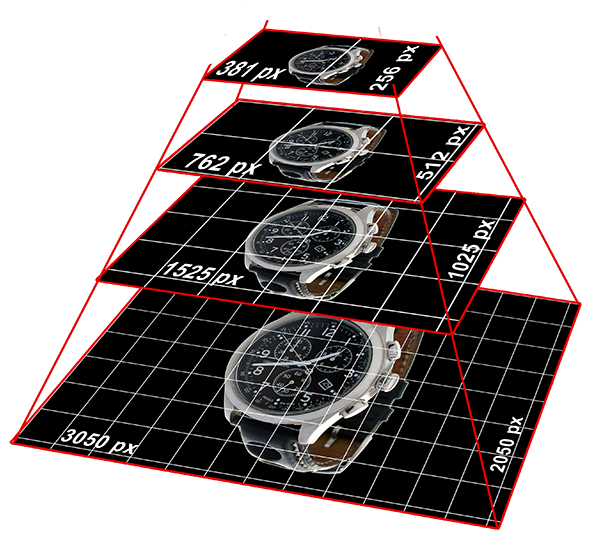
AJAX-ZOOM uses image tiling, multi-resolution technology.
It dynamically loads only requested parts of the high-resolution image, which depends on the zoom level, viewport, and screen resolution.
As you can also see in the Google Maps application, the view visibly gets sharper on zooming and panning when interacting with the map.
AJAX-ZOOM can process image tiling "on the fly," or it can batch convert thousands of images with just a couple of steps. You will find a PHP-based script in the download package, where you can select folders containing many images and batch-process them automatically.
That means that you can easily integrate AJAX-ZOOM into already productive websites within the shortest possible time.
Your high-resolution master/source images are not changed.
Specific settings can also set AJAX-ZOOM to protect the source images to the extent that AJAX-ZOOM is suitable for commercial image providers.
For example, you can set and adjust options for automatic watermarking of the image tiles and all other cached images.
Since the original, large image never loads into browser cache, the entire parent directory, which contains high-resolution images, can be protected, e.g., with ".htaccess" from being accessed over the internet.
However, starting from AJAX-ZOOM version 5.3.0, AJAX-ZOOM can also load the original image
("simpleMode" option)
instead of image tiles whenever it is suitable, e.g., on zoom.
In this case, the image loads entirely into the browser's cache, which is fine for smaller resolution images.
Approximately up to 3 - 4 million pixels, the performance losses are negligible on modern devices.
Depending on the license type, you can also set a resolution threshold to either load the original image directly or use multi-resolution image tiles.
Compatibility
AJAX-ZOOM works in all modern browsers but can also work in legacy IE 9 for the most features.
On mobile touch devices, AJAX-ZOOM supports pinch-zoom, double-tap, and two fingers zoom & pan.
On Windows devices, which have a mouse control and touchscreen, AJAX-ZOOM works excellent for touch interactions on screen too.
It is needless to say that AJAX-ZOOM does not require any browser extensions like Flash, Java, or Silverlight.
Only JavaScript must be enabled in the browser.
JavaScript is enabled by default in standard configurations for all browsers and consumer devices, achieving near-universal viewing.
API, callbacks, extensions
AJAX-ZOOM has an extensive library with API functions, callbacks, hooks, and many extensions.
With the API functions and callbacks, you can create sophisticated web applications without modifying the actual AJAX-ZOOM code.
Our team can tailor customized templates (blueprints) to streamline your project.
If necessary, we extend the AJAX-ZOOM's core functionality and provide it with the next update.
Extensions include, for example, the hotspot editor, mouseover zoom, or various gallery scripts.
Those extensions make use of AJAX-ZOOM API functions or callbacks and are structurally very similar to any jQuery plugin controlled by options.
For instance, you can view such a simple extension in example21.
In this extension, AJAX-ZOOM reads several images from different directories and displays them as a thumbnail gallery.
The user can switch between the folders by clicking on a folder icon generated automatically.
When the user clicks on a thumbnail, that image opens in the AJAX-ZOOM viewer.
The download package contains several more complex extensions than that.
For example, even though it is for an exceptional niche usage, example34 could serve as a good case for far-reaching use of the API.
In this example, several images of an old newspaper load into a canvas with a thumbnail gallery.
Before uploaded to the server, they were subject to an OCR scan, with the position and dimensions of each word stored in XML files.
Users can search for a word or expression using the autosuggest field, and if available, retrieve a list of pages with search results below that search field.
When the user clicks on an object representing a search result, the corresponding page loads, and the word found on that page visually gets marked by a rectangular overlay.
These actions, such as switching the page, marking with rectangular overlay, and simultaneous zooming to the selected word, are triggered by AJAX-ZOOM hotspot API methods.
Integration example
There are several different ways to integrate AJAX-ZOOM into your website.
The easiest way to get to know about this is to inspect the examples.
There is, of course, no best way because it depends on your requirements, the way AJAX-ZOOM should look, and other factors.
Therefore, the following example represents one of many possible solutions:
		<!-- Put the placeholder DIV where ever in the <body> -->
		<div id="test">This id a placeholder DIV</div>
		<script type="text/javascript">
		// Create new object
		var ajaxZoom = {};

		// Define the path to the axZm folder
		ajaxZoom.path = "/axZm/";

		// Define your custom parameter query string
		ajaxZoom.parameter = "zoomData=/pic/zoom/fashion/some_image.jpg|/bilder/ordner1/test.png&example=8";

		// The ID of the element where ajax-zoom has to be inserted into
		ajaxZoom.divID = "test";
		</script>

		<!-- Include the loader file -->
		<script type="text/javascript" src="/axZm/jquery.axZm.loader.js"></script>
You can examine the above code in the HTML source of example9.
It loads a simple gallery with horizontal slider but you could also load a 360 / 3D by changing ajaxZoom.parameter to e.g.
ajaxZoom.parameter = "3dDir=/pic/zoom3d/Uvex_Occhiali&example=17" where
"3dDir" parameter is the path to the folder with 360 images and "example" is the parameter, which defines the configuration set loaded for the player.
You can easily extend configuration sets or change existing ones in /axZm/zoomConfigCustom.inc.php.
Read more about that in the AJAX-ZOOM configuration options system explained in detail article.
Iframes, however, are the simplest way to handle many players with e.g. rotatable product views
or high-resolution images with zoom at the same time.
The AJAX-ZOOM player automatically adjusts itself to the responsive iframe size and can be brought to full screen view by users,
which even works in IOS Safari (iPad, iPhone). In example13
you can see many examples of integrations over iframe including lazy loading iframes.
Future versions
We are constantly working to improve the software. Your wishes, objections and suggestions are greatly appreciated.
Below are some thoughts on key features, which should be implemented.
Easy CDN support probably starting from Amazon S3.
Integration with Adobe scene7 image server.
Limitations
Currently, only one instance per page within the DOM is possible.
But still, there are various ways to present an infinite number of players on a page, e.g., as shown in
this example.
You can also load different content dynamically into one player, e.g.,
as this example shows.
Licensed version works only under the registered domain name(s).
You can, however, test and develop on your localhost by using the free/demo version.
For an additional charge, you can purchase the unlimited commercial version for usage on your company's intranet.
If you need more information on the licensing options or a quotation, please contact the support.
Important product milestones
2024-07-31
Added support for PHP 8.3
2023-11-09
Added support for PHP 8.2
2022-08-16
Added support for PHP 8.1
2018-08-10
Complete rebuilt of the AJAX-ZOOM batch tool.
Amongst other improvements and features, the new batch tool
allows to generate 100% of all cache needed for the frontend,
set important options over the menu, save these options into an external file to load in a different session
and preview images directly in the AJAX-ZOOM player.
2018-06-29
New "simpleMode" option and "Simple" license type released.
The "Simple" license does not have number of images restriction (unlimited) and is more affordable.
Works now on Windows notebooks with touch display including pinch zoom on Windows 8 / 10 with Chrome... (touch events), IE 11 and Edge (pointer events)
The license price primarily depends on the number of different images that display in the AJAX-ZOOM image viewer on a domain.
Unlimited options are available. The costs for the regular licenses are one-time payments!
You can find the complete license agreement and price list on the download page.
Before ordering, we advise you to download and test the demo (light) version within your development environment.
If necessary, we can issue time-limited license keys free of charge. However, AJAX-ZOOM and AJAX-ZOOM modules / plugins
for diverse CMS and shopping carts should work with few restrictions without entering any licensing data!
If something does not work as expected, there must be a different reason than missing license.
Do not hesitate to contact AJAX-ZOOM support
if you encounter any technical difficulties.
Comments (138)
Vadim Jacobi2022-07-06 00:59:17
@Cyril: the next major AJAX-ZOOM version will support WEBP, among many other improvements, new features, and extensions.
cyril2022-07-05 23:51:52
Hello
is it possible to use WEBP images or only JPG/PNG ?
thanks
Cyril
Vadim Jacobi2019-07-16 17:13:33
@Robero, there are plenty solutions such as XAMPP to work on local computer running Windows, Linux, or MAC OS-X. Please consider using one of those. Thank you.
Robero2019-07-14 14:45:49
Your code is great, but I would need to have it work on a local computer without PHP. Is it possible? tx.
Vadim Jacobi2018-09-04 00:48:30
@Nascimento: AJAX-ZOOM works with a sequence of individual images. They need to have unique file names and uploaded into a folder. Then, you point the product tour editor to this folder, create your presentation, save it, and use an example35_x to load... to skip all that rather complicated material I suggest that you use WordPress, which you probably use anyway and the AJAX-ZOOM Plugin for WooCommerce, see under Modules -> WordPress (short code) on this page. Going this way you do not need to write a single line of code and have the possibility to upload the images over the WP backend, create your product tour there, generate a short code and place it anywhere on your WP page. Hope that helps. If there are still any questions, do not hesitate to use the contact form. We do not bite :)
Jonathas Nascimento2018-09-03 20:01:36
Hi, Mr Jacobi.
How exactly the "360º Produkt tour" works? Need I to upload a sequence of individual images that will be showed as in the exemple? Or a .psd file (or other specific type of file) with the complete sequence of images? Sorry if my question sounds stupid, but I am a photographer and I didn´t understand how it works exactly.
Best regards.
Vadim Jacobi2018-08-16 17:30:23
@Max: the original, high-resolution image does not need to be loaded into the player. The path to the source of this image can be protected from being accessed over http. This can be achieved by e.g. htaccess rule on apache servers or others on different servers. If you want a 100% protection, you should consider enabling the convenient AJAX-ZOOM wtrmrk option, where it is possible to let the software also watermark the image tiles at different pyramid levels automatically. As the watermark, you can define a PNG image of your choice.
Max2018-08-16 05:36:56
Hello. Can you please tell me, are the images that in this player somehow secured from downloading via parsing the website?
Can you provide a comparing table with some cheaper player or maybe a list of achievements for this player?
Vadim2018-06-30 14:47:36
@mandeep: from what I know it is not possible to use AJAX-ZOOM in a vb.net project
mandeep2018-06-30 13:13:42
Sir,
can we use 3d zoom with Vb.net,
or can you customized so we can use with our vb.net project
Vadim Jacobi2016-09-20 11:21:24
@ag: yes, you can download AJAX-ZOOM and test the hotspots with your own spin images.
ag2016-09-20 11:00:42
Want to know more about hotspot integration. will free version file works ? wanted to test using difrent images in place of cycle.
Vadim Jacobi2016-04-22 19:17:48
Hello Andrew. I am not sure what you are going to do. Is it about "3D" with multilevel, meaning that you will have more than just one row, like this one? - http://www.ajax-zoom.com/examples/example28.php
If so, how do you get 5000 images? This would mean that you have also about 70 vertical rows which is way too much I would say. The highest we have is http://www.ajax-zoom.com/examples/example15_vr9.php with 810 images, but it is more an example of what is possible and not how one should do it :-)
Andrew2016-04-22 19:06:41
Hi Vadim, I'm thinking of using Ajax-Zoom for a full X-Y-Z-360 image of about 3000 pixels per frame. I need it to be smooth so would use at least 72 frames per rotation. How would Ajax Zoom cope with loading >5000 hi-res images? Would it simply load the relevant tile from the image pyramid?
Many thanks,
Andrew
Maniraj2015-01-13 07:18:56
Really zoom over function will very nice.
Vadim Jacobi2014-08-29 20:32:24
Enzo: there are quite many options to work with hotspots and ofcourse you can use different images, sizes, actions and so on. If you could send me some more detailed draft or maybe even a mockup of what you will be developing, then I could tell you if this is possible with AJAX-ZOOM.
Enzo2014-08-29 20:07:25
Hello, can I have more options to select on hotspot, like colors or other? My idea is to integrate ajax -zoom into my website (asp.net) for configuring bikes(frames, forks, wheel, etc).
Thank you
Vadim Jacobi2014-06-18 19:22:18
Hello Hans, stitching is not provided. This is a task of desktop software and there is plenty of it on the web. Zooming to certain coordinates is possible with the API zoomTo (please check the documentation). It is possible to define zoom level with x1, y1 coordinates or x1, y1, x2, y2 coordinates and some other parameters. Next version 4.1.9 will even provide an online utility to ease the setup of defining these values.
Hans2014-06-18 18:59:55
1) Do you provide stitching of multiple (40 - 50) high res pictures?
2) Then, do you provide zoom at a certain (X,Y) location?
Marsh Jaison2014-05-27 11:47:06
hi can we do a image rotate
Vadim Jacobi2014-03-21 15:49:37
Hello Mark! Interesting question. I would say more yes than no. Depending on the layout and functionality of your application a different API set could be used. I would suggest that you contact us directly with more detailed information, thanks.
mwillard2014-03-20 18:17:01
I am curious if the solution has image draping option. Thanks.
Mark
Kobayashi Online2014-01-28 17:14:54
We could not be more thrilled with the excellent service and level of commitment demonstrated by Vadim. He provided us with a 3D plugin for a site we were developing, groundradar.com. He even went in so far as to Skype us when we needed technical support. Everyone at Kobayashi would like to give Vadim a big, warm thank you!
Vadim Jacobi2013-10-16 10:21:32
Max: you might want to take a look at this API: http://www.ajax-zoom.com/index.php?cid=docs#api_zoomSwitchQuick
There is also an option to enable this switching for internal built galleries: http://www.ajax-zoom.com/index.php?cid=docs#gallerySwitchQuick
Max2013-10-16 04:56:14
It would be great if you had the before-after function. Two photos at the same dimensions and the possibility to switch from one to another while keeping the same position and zoom from the one before - this way all the details of the after image would be more relevant. Let me know if you have this feature and I've missed it.
Thank you and congratulations for a great work!
newwebsitethemes2013-08-26 08:13:12
Very useful and great zooming effect using jquery and css coding, absolutely design for product gallery, thank you for posting this lists.
Carsten2013-08-23 20:23:28
We are really looking forward to build it into our Shop System
safyhost2013-03-28 08:47:42
really like the zoom option is just amazing..thanks..:)
Vadim Jacobi2013-02-18 22:31:38
Hi People. Thanks for all your suggestions and bug reports. We finally released Ver. 4.0 with clickable hotspot support. Take a look at http://www.ajax-zoom.com/examples/example33.php There is an other example which is worth to take a look at: http://www.ajax-zoom.com/examples/example32.php If you have any other suggestions and remarks, do not hesitate to drop us you thoughts.
Vadim Jacobi2012-09-13 22:01:05
To all of You who was asking about clickable / mouseover etc. hotspots: the next AJAX-ZOOM version 4.0 will definitely support hotspots! At 2D, 360 and 3D modes, at all zoom levels and at fullscreen mode. Basically it is already working on our prototype, we just need to write an API for handling it (the easy but intriguing part). Hopefully this will be the last new feature among many, many others in version 4.0 so we will be able to present it to You shortly.
vik2012-08-09 07:24:20
how to save the file? Can it be used with java B/e
Subbu Vadali2012-07-20 20:35:57
We are looking at this tool to integrate with one of our products and certainly require some customization. A couple of such things are: adding annotations, on demand highlighting of text inside the images etc.. Can you please give me details on what would it cost to add these customizations? We are looking at an unlimited .NET version.
Gerhard2012-05-21 10:33:08
Hey guys.
Great plugin, but is it possible to integrate it in to a site that does not use PHP or ASP.NET?
We're looking at incorporating this in to a few of our e-commerce sites.
Vadim Jacobi2012-05-17 21:16:17
for asp.net please use phalanger. see the docs for more info. thanks
mbw2012-05-14 17:57:30
If I install this on php server can I just call the gallery from an ASP.net server? and will it work? Thanks.
chep phim2012-03-29 09:55:26
Very useful for me, its exactly what i need to protect images from my site. Thanks a lot. Please keep it up!
Vadim Jacobi2012-01-25 23:11:30
Ed: I do not know if you have seen this example: http://www.ajax-zoom.com/examples/example10.php Maybe this is something for you. Hotspots might be available in one of the next versions...
Ed2012-01-25 16:53:05
I am looking for something that will zoom into a site engineers drawing on the web, that has hot spots or links in various locations to show photos or info, perhaps in a popup or another page.
Can this software cope with these requests ?
Many thanks
Marcus Heisler2012-01-22 15:03:54
Hi.
Could Ajax zoom be used to create 3D interactive data for insertion into ibooks2 books? I'm looking for a way to create 3D interactive objects generated from images for ibooks2. As I understand it (and I'm not a programmer but a biologist) the 3D object format for ibooks2 is based on object models (i.e meshes?). I would like to use photographs rather than an artificially generated mesh to create this kind of interactive object. Any suggestions would be very appreciated.
Life For Rent2012-01-12 06:49:39
really like the zoom option is just amazing..thanks..:)
Vadim Jacobi2012-01-09 12:08:12
Wil: yes, it is possible to customize the player and turn off certain features. See examples and the docs. If you will have specific questions do not hesitate to contact...
Wil2012-01-09 03:30:08
Hi, Is it possible to customize the skin of this plugin and turn off certain features? Just want to know before we buy. Thanks!
Spark2011-11-28 14:11:35
Interesting post, after I was only looking for a simple Jquery lightbox-image enlarging script, I found this more sophisticated one.
I appreciate it!
Vadim Jacobi2011-11-23 15:56:29
For download the entire image please see here: http://www.ajax-zoom.com/index.php?cid=docs#Download
If you want to download a croped image, see this example with the callbacks: http://www.ajax-zoom.com/examples/example14.php There you will find all needed parameters to process / crop the original image with your custom PHP script.
krupa2011-11-23 13:09:40
Is it possible to allow image saving or print?
Krupa patel2011-11-23 10:42:45
Hi Vadim,
I want to know that is it possible that crop the image which is zoom using ajax zoom .
My Intension is to crop, rotate, zoom and move and then save it
to mysql data table.
Hope you will reply soon.
Spencer2011-11-17 18:05:06
Is it possible to allow image saving or print?
Paul Fijma2011-10-11 17:26:44
I have succesfully added the ajax-zoom to my website and my gamers love it.
haven't found out yet (if possible) how to add my ajax-zoom in such a way that it can be used inside/embedded in a forum, but my players love the new way of displaying the maps!
it is the best upgrade for my website in a long time!
Vadim Jacobi2011-09-30 00:22:02
ASP.NET version implemented with Phalanger (64 bit) will be available soon.
Hassan Abbas2011-08-05 00:02:40
I have successfully implemented this control in ASP.NET using Phalanger. I am really happy with its performance so far.
Thank you.
Vadim Jacobi2011-07-28 12:25:56
Chris: it turns out that this is one of the most requested features at the moment. An other words we have decided to implement it. Supposably there will be only the possibility to add hotspots to non zoomed image at first. Then this functionality will be extended. To the timetable: we are working on accelerating AJAX-ZOOM on mobile devices now. On mobile Safari (iPad) this is already reached. The new version will be released in the next few days. After some optimizations like gesture zoom we would like to start with hotspots, also for 360 degree spin. I can not tell you exactly when it will be ready, hopefully soon, as many customers waiting for it :-)
Chris2011-07-27 22:06:12
Any update on the "hotspots" feature? I am really looking forward to implementing it in my next project.
Joshua2011-07-11 22:25:06
Hello. I'd just like to first say that from what I've seen so far ajax-zoom is a wonderful tool. Thank you for all your hard work!
I'm wondering if the ajax-zoom software is usable for a project I'm working on. I see that I can load the zoom-objects from a mysql database, but what I'm really looking to do is to load the filenames of the zoomtiles from a database. I already have a database I'm working with, I'm just curious if that's within the scope of what the ajax-zoom software will allow me to modify.
Thanks,
Joshua
Vadim Jacobi2011-06-10 17:07:33
Eshan: yes, this is certainly possible as there are also ways to prevent downloading the original image intentionally. Take a look at the API section in the docs. There you will find all the information needed.
eshan2011-06-09 15:42:47
Great job on this, Vadim. Can we add buttons to the viewer that allow people to download the full-size image as well as print the current view? We have a subscription photo product where we want to allow those actions. Thanks in advance!
Vadim Jacobi2011-05-13 09:51:25
Jon Aston: see the watermark options in the docs: http://www.ajax-zoom.com/index.php?cid=docs#watermark
Jon2011-05-13 02:38:01
hi vadim, i also need to know how to "disable zooming" when the image is clicked
and also how to stop the image from centering when the image is clicked.
thanks
jon aston2011-05-13 02:19:02
hi vadim your comments below
where is the annotation feature please?
------------------------
Hi Knacky, an annotation feature is already implemented. You can annotate in multimple places with a background and font(s) of your choice (ttf). Please check the documentation :-)
Vadim Jacobi2011-05-12 20:33:10
Tim: we continiosly work on AJAX-ZOOM and hotspots are at very high order on the to do list. However I can't tell you anything about the release date. What I can tell you is that AJAX-ZOOM will never display any flash content. URL links and HTML – I guess this is the job of a browser, not a player :-)
Tim2011-05-12 15:16:38
Ay idea how far in the future the hotspots will be added? The project I am working on is reasonably urgent so if could get a date that would be great.
Also will the hotspots be able to: display swf, images, url links, video, html?
Thanks again
Vadim Jacobi2011-05-12 13:09:05
Tim: hotspots should be developed in the future. As of the list taking the user to a particular portion of the image – yes, this is possible, see this example: http://www.ajax-zoom.com/examples/example10.php
tim2011-05-12 13:01:12
Also, would it be possible to have a navigation side bar listing the hotspots that when clicked on, would take you directly to it.
For example, I have a map with a church on it. As well as the hotspot on the image (map) the church would also be clickable for the navigation side bar, acting like a shortcut.
That make sense?
Thanks
Tim2011-05-12 12:39:19
Could hotspots be added to the images? I'm thinking of displaying maps with hotspots showing points of interest.
Thanks
Vadim Jacobi2011-05-10 11:48:11
Texastaurus: there are several ways to make it. One way is to use the internally built in buttons - see galleryNavi option in the docs, or use your own buttons or whatever with the method jQuery.fn.axZm.zoomPrevNext(), can be seen in this example http://www.ajax-zoom.com/examples/example7.php and it is also described in the docs.
texastaurus2011-05-09 22:37:14
I'm thinking of using this for a magazine...anyway that I can add previous and next buttons in the viewer?
Vadim Jacobi2011-04-30 13:03:12
Steve: in file /axZm/zoomObjects.inc.php look for $pic_list_data[$k]['thumbDescr']
Steve2011-04-29 17:57:12
Is it possible to replace the image-size description within the galleries with a filename or customized description?
tim2011-04-13 18:51:36
Sorry, please ignore that :D
I've been looking at various different programs like yours today and have got myself a little mixed up!
/tim2011-04-13 18:48:08
Any plans for a mac version?
Thanks
Vadim Jacobi2011-03-31 12:13:31
AJAX-ZOOM has been testet in IE6 with IETester and under Win XP / 2000. Seems to work just fine everywhere. If you are using IETester consider making an update.
HoangLx2011-03-31 08:09:32
can't work IE6
arsal2011-03-02 06:28:51
i like the ajax zoom plugin that works great and the speciality is that the pixcel of the image is not breaking . i"ll try to embed this plugin in my site .GREAT WORK
Vadim Jacobi2011-02-12 01:12:26
Erik: check for iframe in sourcecode of this blog entry:
http://www.xtc-load.de/2010/08/ajax-zoom-fur-xtcommerce/
Erik Madsen Greve2011-02-11 23:04:06
Hi, Nice work!
I like the solution with iframe. Do you have a demo I can put into my iframe to show to my boss until I hopefully get him convinced to buy this beautiful toy :o)
Vadim Jacobi2011-01-09 20:37:03
Richard: hotspots are not implemented at the moment, but planed for one of the nearby updates…
Richard2011-01-07 20:57:04
hello
is it possible to have links in the images, specifically referring to the new spin feature. i am aiming to create a 3d graphic that people can rotate and zoom into and then select the section that they wish to view in more detail.
Beben Koben2011-01-07 19:18:14
so smooth and so elegant
Vadim Jacobi2011-01-03 02:51:04
Wimpy: yes, this is possible. One way would be to set this option dynamically - http://www.ajax-zoom.com/index.php?cid=docs#vWtrmrk
The other way to append a div with the PNG image mask manually, see in this example the way custom toolbar is appended: http://www.ajax-zoom.com/examples/example16.php
Either way - you can get the cropping coordinates with jQuery.axZm.lastZoom object containing all you need to crop and print the original image with your mask on it. For more info take a look at API section in docs.
Wimpy2011-01-02 18:57:29
Is it possible to customize the viewport with user defined overlay mask on top of the ajax-zoomed image? Let's say heart shaped mask for Valentine's day special theme.
Vadim Jacobi2010-12-22 12:14:03
Brent: there is always a probability of "force majeure" or other exceptional circumstances. We can not quarantine these exceptional circumstances don't occur. Actually no one can.
Brent2010-12-21 14:02:14
I know your commercial license says you can but not obliged to release updates, under what circumstances would you not release updates to existing license holders?
Vadim Jacobi2010-11-17 19:05:04
The commercial license is for the lifetime.
Sean2010-11-17 13:13:14
Is the license per site, for the lifetime or per year??
shxxxxz扬2010-11-09 03:08:47
ccccccccccool
Vj2010-10-16 07:12:32
Will this work with ASP.NET, does it need to be wrapped with wisejs or something else before use as a simple div?
Will you let me pan to a specific location on an image, i.e. show a small part of the original image like a map
lbs2010-10-14 17:42:00
hi,sir
i like ajax-zoom software,but i don't install it on my localhost.
;i use sourceguardian to process installation . such as: http://127.0.0.1/ajax_zoom/loaders/sourceguardian/howto-install.php
Thanks for your support!
br/lbs
Vadim Jacobi2010-09-22 14:58:39
There is no plugin or any instructions for Joomla right now, but of course this is possible. Take a look at the examples to see some general ways of integration. An example with hotspots should be available soon…
Carlos Rabaça2010-09-21 07:21:27
Is it possible to integrate it with Joomla and set hotspots on regions of an image such that clicking on it we open an article or a text box?
Rick Hayes2010-09-12 17:47:30
WOW! Who did your navigation bar? I would love to have the code for that.
Vadim Jacobi2010-08-21 22:27:57
Hi Phil, thanks a lot! I have sent you a PM to your email address.
Phil E2010-08-21 21:16:08
Under 5 minutes to install and embed into my current Drupal 6 project.
I'm Impressed!
If possible, could you forward information or a guide on integration into other CMS systems, I am a developer of custom Drupal modules and would like to create a module to automatically integrateAjax Zoom in to all my forthcoming projects.
max2010-08-16 08:43:32
Good Job.
vinupdlm2010-08-15 21:52:22
very usefull script
Vadim Jacobi2010-07-02 01:33:12
Brightness & contrast UI? Hmm, server side no problem with ImageMagick. Life somewhat problematic concerning Internet Explorer, as always. There is a library called pixastic, which does those kinds of effects. Which ones are suitable for your purpose? Use the support form to write a pm.
Robert Anderson2010-07-01 18:33:16
You should really add contrast and brightness controls! The vast majority of image scripts focus only on zooming, however relevant image details, like those found in a medical x-ray, are best explored/revealed with UI contrast and brightness controls - in addition to zooming. Any ideas?
Vadim Jacobi2010-06-30 12:35:19
Since now we got a pretty stable version of AJAX-ZOOM there are plans to gradually release several extensions or at least integration guides for several CMS and webshops. Joomla is also on the todo list. As of porting to other development environments like .net it needs much more time, so unfortunately I can't tell if and when it will happen.
Law2010-06-30 04:12:50
Will there ever be an extension/plugin for Joomla 1.5x?
If so... that would be extremely nice and a lot of people will use it.
Derek Klingman2010-06-25 21:22:24
I agree with other that it'd be nice it was available for other development environments. We are a .net development shop and this would make a great tool to have.
Fakeyede Mobolaji2010-06-23 09:07:09
God, This is wonderful. I think you really really really need to port this to ASP.NET. If u don't use ASP.NET, please learn to. Just amazing. I will have to make do with the PHP implementation for now. I hope i don't need to be a PHP guru to do this. Thumbs up.
Vadim Jacobi2010-06-22 15:12:47
All constrains result from the limitation of the hardware to process very large images – RAM, processor power and disc space. See documentation for some additional info and benchmarks. Except the free demo version there are no limitations regarding the software itself.
Allison2010-06-19 22:02:37
Are there any limitations on image size?
Vadim Jacobi2010-06-16 20:16:57
In the current state AJAX-ZOOM relies on PHP and at there are no urgent plans to make any Java, .net or other mods of the script. There are so many additional features we want to implement that it makes no sense to port AJAX-ZOOM to a different programming language right now. But as one of the customers has done You could also place AJAX-ZOOM in an iframe from a source supporting PHP. May be this is an adequate solution for You as well. PS: Germany – Australia was the best match so far!?
John2010-06-16 11:33:33
Can I use these components in Java based Applications??
Vadim Jacobi2010-06-15 12:05:55
There are no build in options allowing you to place image maps or other html overlays over the "big image". This might be possible in the future releases. Thanks.
JJPhoenix2010-06-14 12:22:55
Moin.
Is it possible to use image maps (e.g. useMap="#map_info") on the big image?
Vadim Jacobi2010-06-12 00:07:25
Yes, AJAX-ZOOM can be displayed inside a lightbox, see the examples... Concerning the "ajax-zoom" logo displayed and the disability to zoom/pan - this has to do with the nature of AJAX-ZOOM interacting with the server. Theoretically there are some ways to avoid this, at least it will be considered to remove this issue optionally, as there are certainly some cons doing this. But thanks for Your feedback, indeed we have already thought about it :-) By the way: You can remove the logo or replace it with whatever you want. Also You can adjust the time when AJAX-ZOOM interacts with the server after the last user action, an other words the time when this logo is shown.
dr paul2010-06-11 18:04:21
will it run inside a lightbox?
Marcus Tucker2010-06-11 16:02:28
Very cool, my only criticism is that it's very annoying that you can't pan/zoom while the animated "ajax-zoom" logo is displayed, which kept appearing
Eugene Koekemoer2010-06-08 19:05:59
Well done! Exactly what I was looking for! Thanx :D
Asshurim Larita2010-06-03 09:42:04
Ive been using JQuery for weeks.. its easy to used... coz im fun of exploring ajax.. now i will try some plugins
Henrik2010-05-29 21:39:10
Will this work on eg. Iphones and other HTMl compatible mobile browsers?
Moiz2010-05-29 10:23:20
Nice plugin!!
Is it free to use in open source project?
Thanks!
Vadim Jacobi2010-05-22 23:52:16
You can not save the image with right click in AJAX-ZOOM. Even though one could do it, there are plenty of options like watermarking to prevent this. Also the larger original image never loads into cache and the zoomed images can also be watermarked. In fact AJAX-ZOOM is all about the prevention of stealing images online :-) Disabling right click is surely not enough.
leicu2010-05-22 20:32:15
Does this have a plugin or sometype of support that disables right clicking, clip board, or print screen options on Internet Explorer, Opera, and Mozilla Firefox? The biggest problem is having images stolen online.
Bill2010-05-21 00:33:08
Excellent.....What a brilliant plugin!!!
DrPhill2010-05-20 11:48:58
Hi, gr8 app! I'm trying to integrate it into an old (1.0) Joomla cms site for a friend - can you givve me any hints for doing this without a development testbed?
Doc
prabhaswara2010-05-18 08:02:22
mantab.. sekali gan...
very.. very.. wonderfull.. :D
Sven2010-05-18 03:45:26
Love your plugin, it is amazing!!!
Vadim Jacobi2010-05-17 14:04:47
Concerning the two previous questions: currently there are no options or any other easy way to display overlays above the zoom image. I will put this issue on the task list. Many thanks for your ideas!
Kerry2010-05-12 09:07:06
Is it possible to use this technology with HTML comment? Similar to google maps where you can scroll around and zoom in and out?
John Chambers2010-05-12 01:14:16
Are there plans for allowing the developer to add clickable icons on top of the image?
Boss2010-05-06 10:17:00
Interesting
Vadim Jacobi2010-05-05 00:09:03
Question: will it works with ASP.net website?
Answer: Take a look at this projects website: php-compiler.net and tell me if it worked. Thank you.
Sandeep Motupalli2010-04-30 23:00:47
I really love the annotation feature. will it works with ASP.net website?
Vadim Jacobi2010-04-27 12:25:46
看起来不错,例子下载的时候不方便 - very interesting point :-)
coolion2010-04-27 03:19:06
看起来不错,例子下载的时候不方便
Vadim Jacobi2010-04-23 16:17:44
The download package has been updated. It now works with PHP 5.3.x. The only updated file is axZm.class.php
Vadim Jacobi2010-04-14 19:27:46
Ok, now we could reproduce the failure described by Manish Sharma above. Apparently, if someone wildly hits the reload button, the code inside $(window).load event is triggered before the window is actually reloaded. This has nothing to do with AJAX-ZOOM itself and since we believe, that this is a pretty uncommon behavior for a user, there is no need to change anything in AJAX-ZOOM on default. However, if you expect you users to do so, you can delay the execution of $.fn.axZm() method inside $(window).load event, e.g. $(window).load(function(){setTimeout(function(){$.fn.axZm();}, 1000);});
In case you use drawZoomJsLoad class method you need to adjust it accordingly in axZmH.class.php
Vadim Jacobi2010-04-14 17:15:34
Tank you for your comment. Unfortunately we could not reproduce the problem you described. Would you mind to provide us with a link of your installation? Also please tell us which browser exactly causes this failure. If there should be a problem with AJAX-ZOOM we will certainly be able to fix it. Does someone out there experience the problem described by Manish Sharma too?
Manish Sharma2010-04-14 16:47:37
Hi,
I've downloaded and tried to use ajax-zoom plugin using JQuery. It works well , except for condition when I refresh my page twice in a very short interval, not allowing my first refresh to complete loading the page. In this case your plugins stuck and hangs the browser. This problem comes every time I double refresh my page. I was planning to buy your product for commercial use, but after seeing this problem , I've taken a step back. I suggest you guys to look into this problem and resolve it because what you have made is really good tool.
:)
Vadim Jacobi2010-04-08 13:43:31
Question: can this tool be used with ASP.net website?
Answer: We did not try it yet, but take a look at this projects website: php-compiler.net Did it help?
Sanjith J Pillai2010-04-08 08:40:18
Can this tool be used with ASP.net website? If yes, please let me know if any samples, documents etc are available for such implementations.
Dallas2010-04-06 04:46:15
Very nice script
Vadim Jacobi2010-04-06 02:15:50
Hi Knacky, an annotation feature is already implemented. You can annotate in multimple places with a background and font(s) of your choice (ttf). Please check the documentation :-)
Anthony2010-04-05 18:34:08
Nice work this is great...
Knacky2010-04-05 16:44:57
Incredible! Ultra clean. One thing I would love to see is an annotation feature...
Bhavin Vora2010-04-05 13:04:18
your site is design supperly
Vadim Jacobi2010-04-04 04:41:01
Leave your comments open!
Leave a Comment
Looking for a place to add a personal image? Visit
www.gravatar.com
to get Your own gravatar, a globally-recognized avatar. After you're all setup,
your personal image will be attached every time you comment.
To use the live support chat, MS Teams is required.
If live support via MS Teams is not available immediately, please leave us a message or send an email using the contact form.
We respond to every inquiry or question related to the AJAX-ZOOM software!










is it possible to use WEBP images or only JPG/PNG ?
thanks
Cyril
How exactly the "360º Produkt tour" works? Need I to upload a sequence of individual images that will be showed as in the exemple? Or a .psd file (or other specific type of file) with the complete sequence of images? Sorry if my question sounds stupid, but I am a photographer and I didn´t understand how it works exactly.
Best regards.
Can you provide a comparing table with some cheaper player or maybe a list of achievements for this player?
can we use 3d zoom with Vb.net,
or can you customized so we can use with our vb.net project
If so, how do you get 5000 images? This would mean that you have also about 70 vertical rows which is way too much I would say. The highest we have is http://www.ajax-zoom.com/examples/example15_vr9.php with 810 images, but it is more an example of what is possible and not how one should do it :-)
Many thanks,
Andrew
Thank you
2) Then, do you provide zoom at a certain (X,Y) location?
Mark
There is also an option to enable this switching for internal built galleries: http://www.ajax-zoom.com/index.php?cid=docs#gallerySwitchQuick
Thank you and congratulations for a great work!
Great plugin, but is it possible to integrate it in to a site that does not use PHP or ASP.NET?
We're looking at incorporating this in to a few of our e-commerce sites.
Can this software cope with these requests ?
Many thanks
Could Ajax zoom be used to create 3D interactive data for insertion into ibooks2 books? I'm looking for a way to create 3D interactive objects generated from images for ibooks2. As I understand it (and I'm not a programmer but a biologist) the 3D object format for ibooks2 is based on object models (i.e meshes?). I would like to use photographs rather than an artificially generated mesh to create this kind of interactive object. Any suggestions would be very appreciated.
I appreciate it!
If you want to download a croped image, see this example with the callbacks: http://www.ajax-zoom.com/examples/example14.php There you will find all needed parameters to process / crop the original image with your custom PHP script.
I want to know that is it possible that crop the image which is zoom using ajax zoom .
My Intension is to crop, rotate, zoom and move and then save it
to mysql data table.
Hope you will reply soon.
haven't found out yet (if possible) how to add my ajax-zoom in such a way that it can be used inside/embedded in a forum, but my players love the new way of displaying the maps!
it is the best upgrade for my website in a long time!
Thank you.
I'm wondering if the ajax-zoom software is usable for a project I'm working on. I see that I can load the zoom-objects from a mysql database, but what I'm really looking to do is to load the filenames of the zoomtiles from a database. I already have a database I'm working with, I'm just curious if that's within the scope of what the ajax-zoom software will allow me to modify.
Thanks,
Joshua
and also how to stop the image from centering when the image is clicked.
thanks
where is the annotation feature please?
------------------------
Hi Knacky, an annotation feature is already implemented. You can annotate in multimple places with a background and font(s) of your choice (ttf). Please check the documentation :-)
Also will the hotspots be able to: display swf, images, url links, video, html?
Thanks again
For example, I have a map with a church on it. As well as the hotspot on the image (map) the church would also be clickable for the navigation side bar, acting like a shortcut.
That make sense?
Thanks
Thanks
I've been looking at various different programs like yours today and have got myself a little mixed up!
Thanks
http://www.xtc-load.de/2010/08/ajax-zoom-fur-xtcommerce/
I like the solution with iframe. Do you have a demo I can put into my iframe to show to my boss until I hopefully get him convinced to buy this beautiful toy :o)
is it possible to have links in the images, specifically referring to the new spin feature. i am aiming to create a 3d graphic that people can rotate and zoom into and then select the section that they wish to view in more detail.
The other way to append a div with the PNG image mask manually, see in this example the way custom toolbar is appended: http://www.ajax-zoom.com/examples/example16.php
Either way - you can get the cropping coordinates with jQuery.axZm.lastZoom object containing all you need to crop and print the original image with your mask on it. For more info take a look at API section in docs.
Will you let me pan to a specific location on an image, i.e. show a small part of the original image like a map
i like ajax-zoom software,but i don't install it on my localhost.
;i use sourceguardian to process installation . such as: http://127.0.0.1/ajax_zoom/loaders/sourceguardian/howto-install.php
Thanks for your support!
br/lbs
I'm Impressed!
If possible, could you forward information or a guide on integration into other CMS systems, I am a developer of custom Drupal modules and would like to create a module to automatically integrateAjax Zoom in to all my forthcoming projects.
If so... that would be extremely nice and a lot of people will use it.
Is it possible to use image maps (e.g. useMap="#map_info") on the big image?
Is it free to use in open source project?
Thanks!
Doc
very.. very.. wonderfull.. :D
Answer: Take a look at this projects website: php-compiler.net and tell me if it worked. Thank you.
$(window).load(function(){setTimeout(function(){$.fn.axZm();}, 1000);});In case you use drawZoomJsLoad class method you need to adjust it accordingly in axZmH.class.php
I've downloaded and tried to use ajax-zoom plugin using JQuery. It works well , except for condition when I refresh my page twice in a very short interval, not allowing my first refresh to complete loading the page. In this case your plugins stuck and hangs the browser. This problem comes every time I double refresh my page. I was planning to buy your product for commercial use, but after seeing this problem , I've taken a step back. I suggest you guys to look into this problem and resolve it because what you have made is really good tool.
:)
Answer: We did not try it yet, but take a look at this projects website: php-compiler.net Did it help?